Category: Agents

  • Fantasy Football and AI – Week 6

    We’re back with the week 6 AI managed fantasy football team and we got another win! The team’s record is now 4-2-0 and sits 3rd in the league.

    Here is the final lineup that was fielded for week 6 and the points
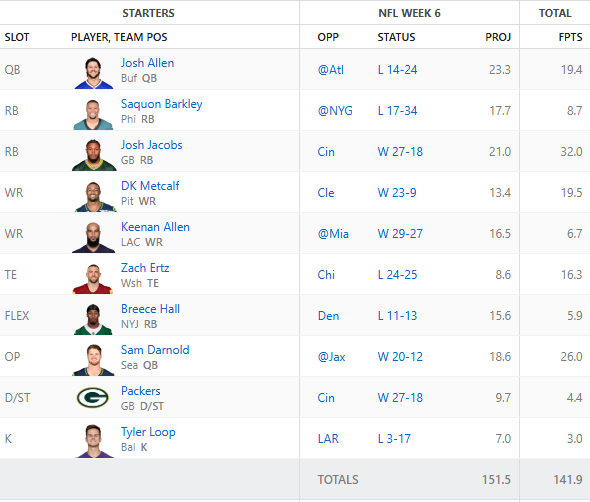
    There were a couple players on the bench that did better. Keenan Allen and Breece Hall could have been swapped for pretty much anyone on the bench and we would have had a few more points. A win is a win. One thing to note is that we had a game time injury of Dalton Kincaid and I had to pull Zach Ertz in at the last minute to avoid getting a zero.

    For week 7 we are starting to see both injury and bye weeks happening. The AI will have to make some pretty deep roster moves in order to fill the gaps. Here is the initial starting lineup:
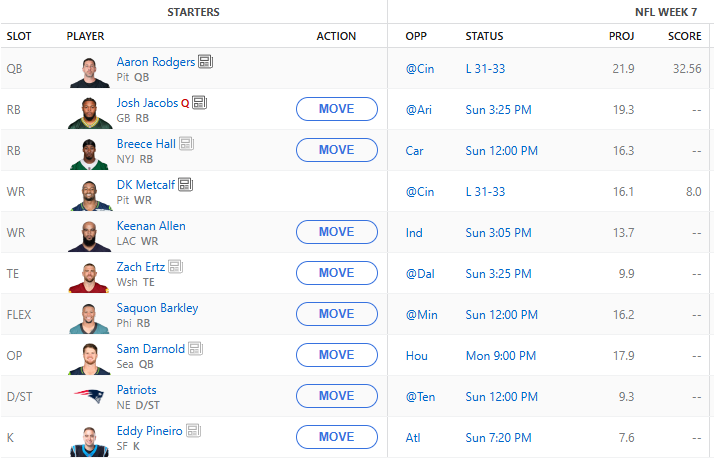
    Because of the BYE weeks we are picking up Aaron Rodgers who put up a good game against Cincinnati last night. DK did not have a great night last night. We picked up the Patriots defense as well as Eddy Pineiro to fill in some slots. I think the Patriots against Tennessee will be an interesting matchup given that the Titans fired their head coach. Mike Vrabel has the Patriots firing again and hopefully he can shut them out and we can put up some big points!

    From a tech perspective, I’m slowly putting together an MCP server to help create some efficiencies when working with the DynamoDB tables. Hopefully, if we can handle that, the overall application response time will be faster. If I wasn’t traveling AGAIN this weekend I would have made it a hackathon. Hopefully for week 8!

    Subscribe for updates.
  • Using Strands to build an AWS Cost Analysis Agent

    Taking a break from Fantasy Football today to talk about a quick weekend project I put together.

    A friend of mine was chatting about how their AWS costs are getting out of control and they aren’t sure where to start when it comes to cleaning up the account. This prompted me with an idea to utilize AI to build an Agent that can interact with your AWS account to review resources, provide cost analysis and give you clear CLI commands or console instructions to help clean up the account.

    In order to do this, I wanted to incur as little cost as possible. So, I built a Docker image in order to run it locally. First, there is a shell script that will build an IAM User in your account that provides read-only access to the account, Cost Explorer access and access to Bedrock (to communicate with an AI model).

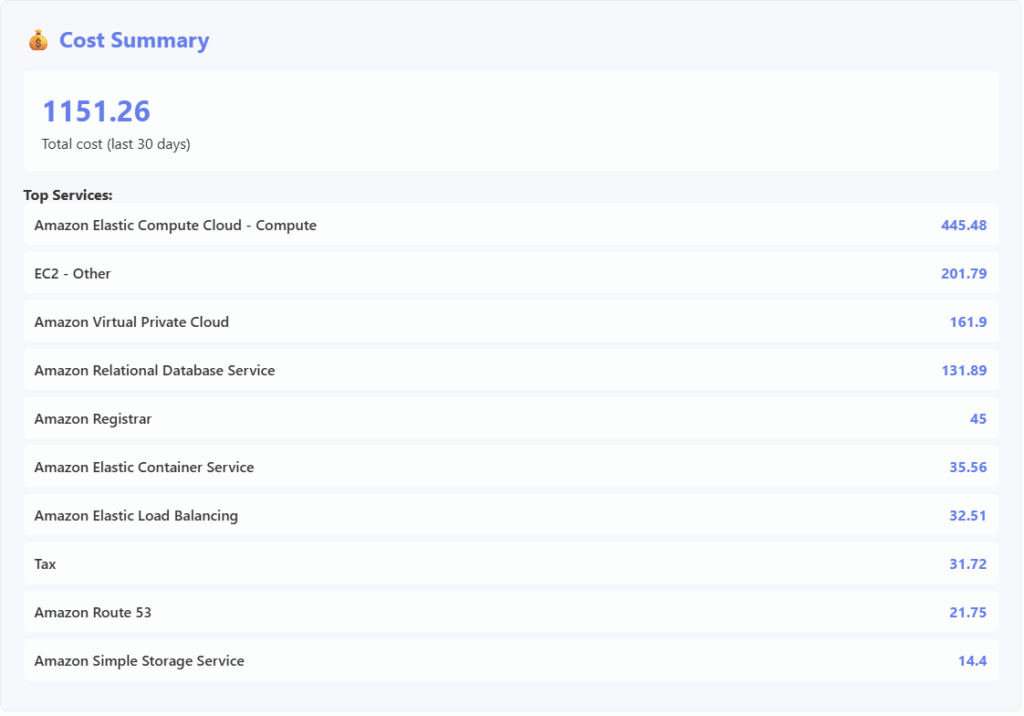
    The Docker image runs and builds an Agent that interacts with whichever model you want to utilize. I picked Amazon’s Nova model just to keep the costs down. The container then presents a web interface where the account’s bill break down will be displayed:

    It will also display some common costly resources and their counts:

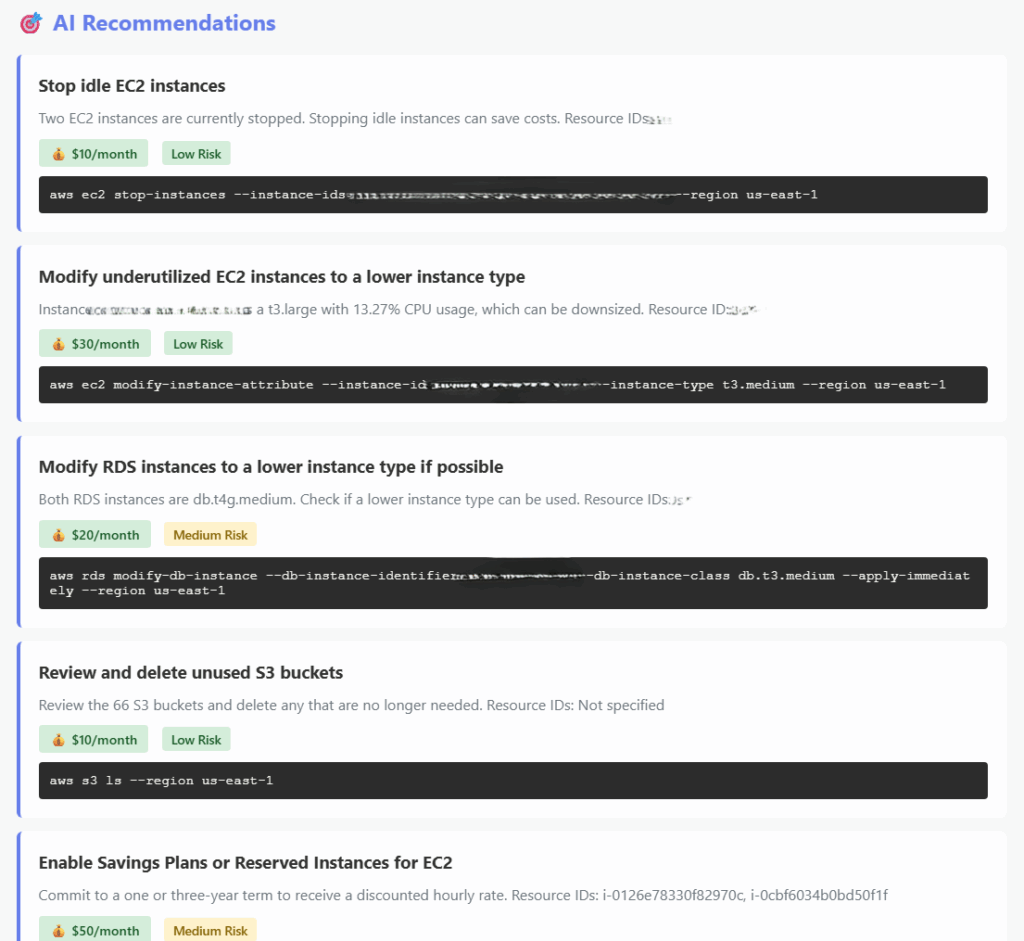
    The next block is where things get very helpful. The AI will present to you suggestions as to how to save some money as well as some risk calculations. Because I ran this against my real account I had to blur out some information but you get the idea:

    So, now you have some actionable activities to work through to help you save money on your AWS bill. But what if you have more questions? I also included a simple chat box to help you work with the bot to come up with other explanations or find other ways to save cost.

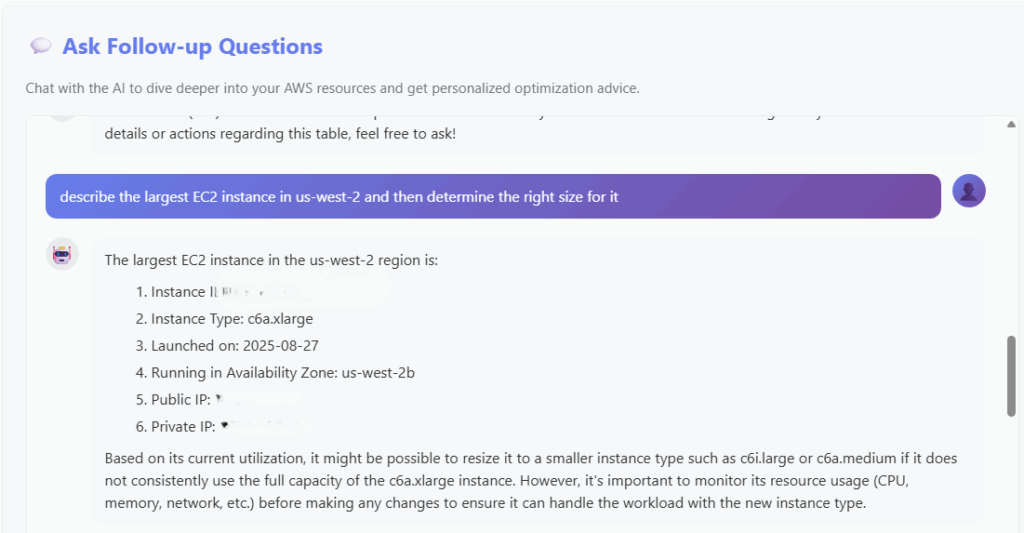
    So I asked the AI to find the largest instance in my account and then determine the right size for it. Here is the response:

    Why would this be important? Well, if you had the AI review all of the instances in your account you could identify EC2 instances that are oversized and have them be changed accordingly. After I implemented a few of the changes that the AI recommended (and verified they didn’t break anything), my account billing decreased by about $100.

    If this is something you are interested in running on your own account feel free to reach out! I’d be happy to help you setup up the container on your machine and make suggestions as to how to save some money!