Blog

  • What I’ve added to GridIron Data in the last month

    What I’ve added to GridIron Data in the last month

    If you’ve been following my fantasy football posts, you know I run my team off a data set I’ve been building at gridirondata.com. Over the last month or so it went from “an API I use for my own team” to something I’d actually put up against the paid services. My team is 6-3 and in second place overall, though I’m on a two-week losing streak, so the data isn’t magic. I’ve been actively building and adding new features (and users!).

    It works inside your AI assistant now

    This is the big one. GridIron Data now has a hosted MCP server, so you can connect it to ChatGPT, Claude, Cursor, VS Code, Gemini CLI and a few others. You sign in with your GridIron account and then just ask questions:

    • “What are the top 10 RB projections for week 11 in half-PPR?”
    • “Any injury news on this player?”
    • “Who are the Bears’ starting wide receivers?”

    The assistant pulls the answer from live data instead of guessing. There’s a setup guide with a page for each assistant (ChatGPT, Claude, Cursor, Gemini CLI, GitHub Copilot), and it’s listed in the official MCP Registry. I’ve also submitted it to the Claude and Perplexity directories, and the ChatGPT plugin is in review.

    This fixed the exact problem I wrote about in week 7, when my AI agent didn’t know Trevor Lawrence and Josh Allen were on bye. It can look that up now.

    My own weekly projections

    Until now the projections came from outside sources. GridIron now makes its own. They start from public play-by-play data and weather, then blend in sportsbook player prop lines, snap share and a bias correction. On game day they refresh as inactives come out, and they freeze at kickoff.

    Every Tuesday a report card grades last week’s projections against what actually happened. If they’re off, you’ll see it.

    Injuries within minutes

    Injury statuses now update within a couple of minutes of a change, with a daily cross-check against a second source. Pro accounts can get those changes pushed to them by webhook, so you don’t have to keep asking.

    Injury and news history is kept for about three years now, which is what made my in-game injury backtest possible.

    Betting and prop data

    A note first: I don’t condone or support gambling. This section is for people who build their own models and like the numbers, and nothing here is betting advice.

    For the people who build their own prop models:

    • Player-prop probabilities: give it a stat line and it returns the chance of going over or under, plus fair no-vig odds. It’s a model estimate.
    • Per-stat projections, odds on the schedule and defense vs position.
    • A usage endpoint with target share and carry share, and box score lines on the stats.
    • A Friday post with the week’s usage data for prop modelers, and a guide for pricing props yourself.

    More of the data you need on game day

    • Depth charts for all 32 teams, with the real starter at every position on offense and defense.
    • Official game-day inactives.
    • Offensive line injury data, because a missing left tackle matters more than people think.
    • Rest-of-season projections, the schedule and bye weeks.
    • Lookups by ESPN or NFL player id, so it’s easier to match against other data sets.
    • The news desk now follows the top 300 players instead of 150.

    Easier to start, easier to pay for

    • Sign in with Google or GitHub.
    • A free plan that covers player lookups and this week’s projections.
    • Yearly billing: Basic is $45 a year and Pro is $249 a year.
    • A Pro + Commercial plan ($49 a month or $490 a year) for anyone building a product on the data, with a commercial license.
    • An off-season pause, so you’re not paying in March. It picks back up August 1.
    • An affiliate program that pays out through Stripe.

    Guides and videos

    Most of the guides now have a short narrated video walkthrough: start/sit, streaming by matchup history, backtesting projections, pricing props, the trade analyzer and connecting an AI assistant. They’re all on the guides page. There’s also a Python client and a published OpenAPI spec if you’d rather skip straight to code.

    You can also follow along on X at @gridirondata_ai. It posts the Friday prop notes and the Wednesday projection grades automatically.

    What’s next

    Next up is getting ready for the off-season: rookies, the draft and dynasty data, so there’s something useful between February and August.

    If you play fantasy football or tinker with sports data, a free account is at gridirondata.com. If you connect it to your AI assistant, let me know what you ask it. That’s where most of my ideas for this have come from.
  • Fantasy Football and AI – Week 6 results and a look at week 7

    Fantasy Football and AI – Week 6 results and a look at week 7

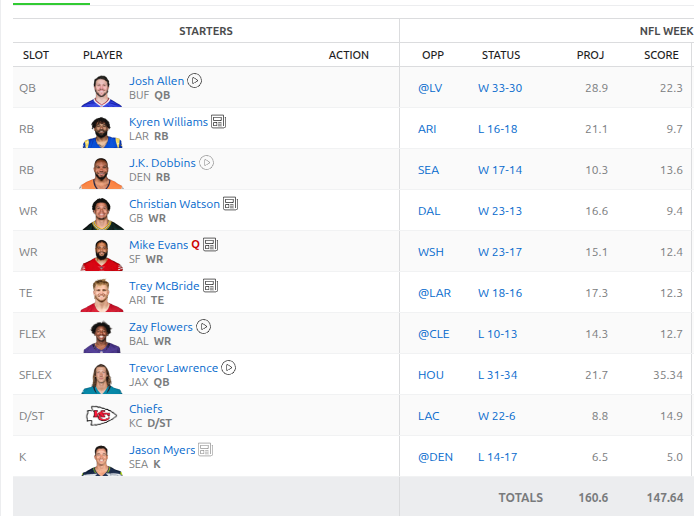
    Week 6 came and went. It was fairly uneventful from our teams perspective. We streamed a new defense as the Vikings were on BYE. The Chiefs turned up big against the lack luster Chargers. We took down another team and are now 5-1 on the season and currently in first place!

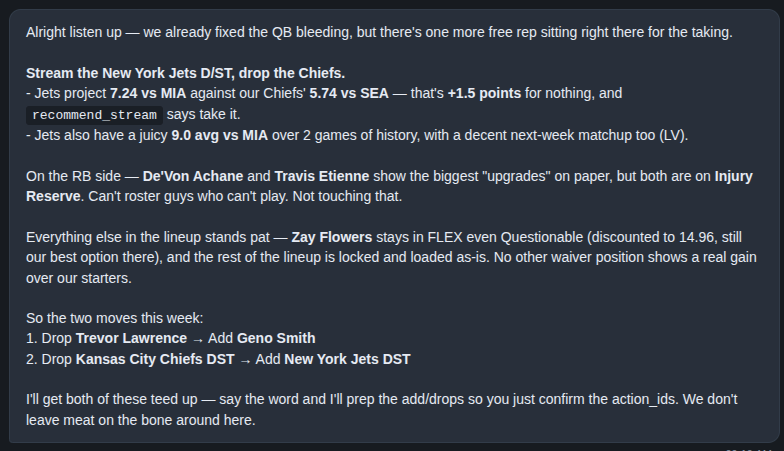
    As I looked into planning week 7’s starting lineup the AI agent was failing to see that Trevor Lawrence and Josh Allen were on BYE.

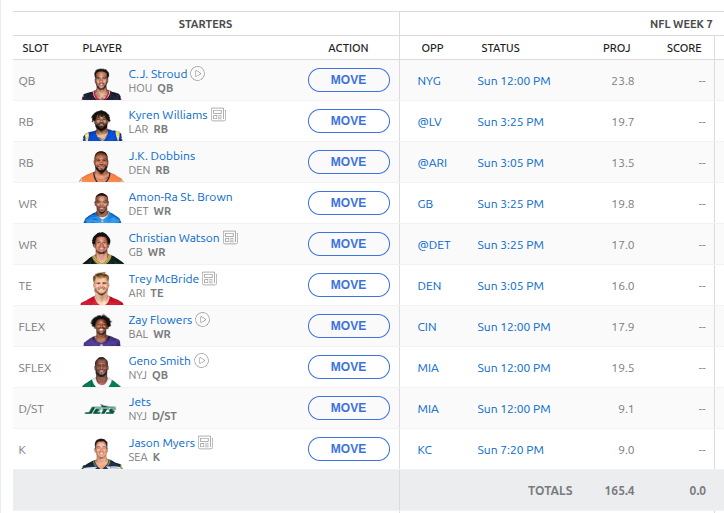
    Here are some changes that the AI has suggested and we implemented for week 7.

    So, a pretty decent shake up this week. I’m hoping we can get the hot hand of Trevor Lawrence back in week 8 but we shall see who claims who!

  • One person, one terminal, a team of AI agents: how I build software now

    One person, one terminal, a team of AI agents: how I build software now

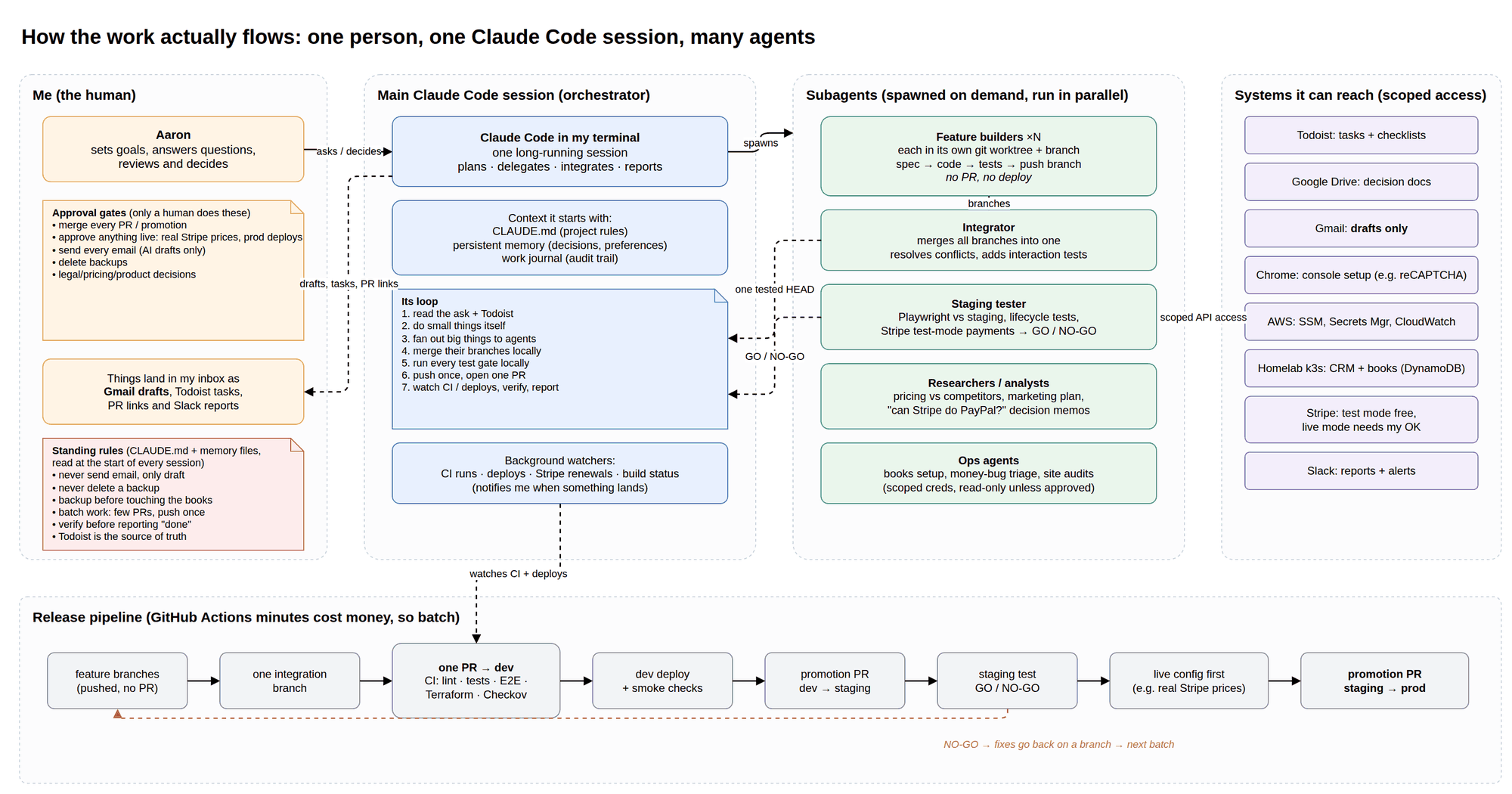
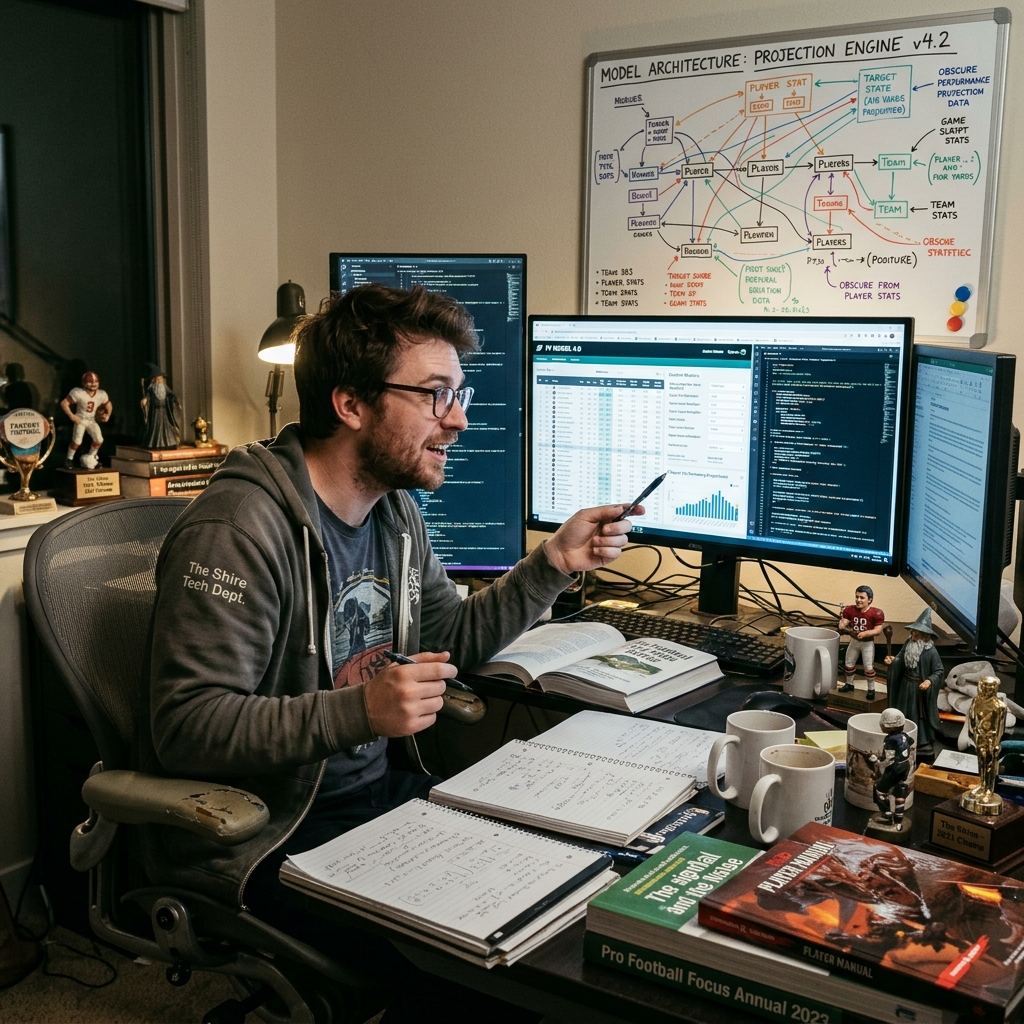
    Diagram: me, one Claude Code session, the subagents it spins up, the systems it can reach, and the batched release pipeline
    How the work flows: me, one Claude Code session, and the agents it spins up

    I build software in my free time. Lately that means my homelab: when there’s an app I’d normally pay for, I build my own version and run it at home. So far that’s a document archive that reads and files whatever I scan, a household finance app, a lockbox for the numbers a family shouldn’t keep in a spreadsheet, and a pile of smaller tools around them.

    I don’t write most of the code. One Claude Code session running in my terminal does. It acts like a project lead, handing pieces of the work to other AI agents and putting the results back together. My job is to make decisions and approve things.

    I’ve used the same setup for a product launch, for client work and for the homelab, and the rules turned out to be the same every time. Here’s how it’s set up, and the rules that keep it from going off the rails.

    The shape of it

    There are three layers:

    • Me. I set the goal, answer questions, and approve anything that touches real money, real data or other people.
    • One main session. This is the Claude Code instance I’m talking to. It reads the project’s rules, checks my task list, does small things itself, and hands big things off.
    • Subagents. When there’s real work to do, the main session spins up separate agents and runs them in parallel. Each gets a written brief, its own copy of the repo (a git worktree) and its own branch. When it’s done, it reports back.

    That’s one project. Once you have several, each project gets its own main session, and the sessions can message each other. That turned out to matter more than I expected. This week the homelab session settled on a new look for my dashboard. I told the session for a different project to use it. It asked the homelab session where the design lived, got back a written list of the colors, the layout and the choices it had decided against, and restyled every page of that project to match. The same day another session needed a list of to-dos filed for me. It asked the session that already had access to my task list, and that one filed them and reported back what it had created.

    I didn’t relay any of that. I said what I wanted, and the sessions worked out who knew what.

    Rule 1: batch the work, release once

    Left alone, every agent opens its own pull request, and every push kicks off a full build and test run. If you pay for build minutes, that adds up. Even if you don’t, five half-finished changes landing separately is five chances to break something.

    So the rule is:

    • Agents push branches but don’t open pull requests.
    • The main session merges them locally, runs the full test suite on my machine, and pushes once.
    • One pull request, one build, then one deploy.

    One thing to add: have it clean up after itself. Every agent’s private copy of the repo stays on disk until something removes it. When I finally looked at one project, there were 34 of them taking up 6.7 GB, nearly all for work that had already merged.

    Rule 2: the real thing is where the truth comes out

    Passing tests tell you the code does what the tests expect. They don’t tell you it works. The bugs that matter show up when someone, or some agent, uses the real thing the way a person would.

    My document archive is the best example I have. None of these came from a test. They came from using it:

    • A photographed statement came back a quarter unreadable. Three pages, one of them sideways. Reading each page more than once, and turning the sideways one, got that down to 6%.
    • The text reader was fighting itself. It sized itself for every processor in the machine while the app was only allowed one, so a page took 9.3 seconds when it should have taken 3.2. Run two scans at once and a page took so long that it timed out, and the document got filed with no text at all.
    • Uploads from a phone died at exactly 60 seconds. On a slow connection the upload simply took longer than a default timeout in front of the app. From the outside it looked like a flaky app. It was one setting.

    The dashboard had its own version of this. Its health widget showed a green dot for an app that had never been deployed, because a “page not found” answer counted as healthy. Nothing flagged it, because nothing was failing.

    So before anything is called done, an agent has to exercise it for real: click through the deployed site, upload the actual file, run the flow end to end with test data. Then it says go or no-go.

    Rule 3: the AI never makes the outward-facing decisions

    This one is non-negotiable, and it’s written into a rules file the AI reads at the start of every session:

    • It never sends email. It writes drafts into my Gmail, and I send them. (That rule exists because of a near miss where someone almost got the same email twice.)
    • It never deletes a backup. Only I do.
    • It backs up before it changes real data, and it logs the change in a work journal: what changed, why, the backup it took, and the numbers before and after.
    • Anything live needs my OK. It does a dry run, shows me exactly what will happen, and waits.
    • Some things it never sees. The lockbox holds passport and account numbers. Its rule is one line: none of it is ever given to an AI model.

    The same thinking applies to automation that runs when I’m not watching. I have a small script on my router that restarts the VPN connection when it goes slow. It has to see fifteen minutes of slowness before it acts, it checks that my internet isn’t the real problem, and after three restarts in a day it stops and tells me, because at that point restarting isn’t the fix. Something that can act by itself needs a point where it gives up and asks.

    Rule 4: make it check its own claims

    AI is confident. That’s not the same as right, and the fix is to check claims against evidence instead of asking how sure it is.

    The document archive taught me this one too. It uses a model to read each document and pull out the date, the sender and the amount. On a handwritten childcare invoice it reported 90% confidence, and every value was invented. It read “$20” as “$ZO” and gave a service period starting on February 29 in a year that doesn’t have one. Its confidence was only ever about which category the document belonged in.

    So the archive doesn’t go by the model’s confidence anymore. A document gets flagged for me to review if a value it pulled out doesn’t actually appear in the text, if a date can’t be true, or if the scan itself was hard to read. Plain checks, with no model involved.

    The same goes for what it writes about its own work. My homelab notes said an old service had been removed from every build pipeline. When an agent checked, 12 pipelines still loaded it. The dashboard listed which machine ran which app, and three of four were wrong. Now the rule is to check the running system, not the notes, and to fix the notes when they disagree.

    Rule 5: write decisions down where people will find them

    Small decisions pile up fast. If they only live in a chat, the next session starts from zero and makes a different call.

    • Every decision becomes a task or a note in Todoist, which is my source of truth.
    • Rules that should hold next time go into the project’s rules file, with the reason. “Never delete a backup” is a rule. The story of what happened the one time it did is what makes the next session take it seriously.
    • The homelab keeps a map of what exists and a short list of how new things get built there, so a new app starts from the same conventions as the last one.
    • At the end of a long day, I have the main session go through the task list and close what shipped, with notes on where each thing landed.

    What I’d tell you if you try this

    • Keep one session in charge of each project. One orchestrator with a clear picture beats five independent chats stepping on each other.
    • Give agents narrow briefs and their own branches. Parallel work is great until two agents edit the same file. Separate copies plus one integration step fixes that.
    • Release in batches. Merge locally, test once, push once.
    • Trust the real thing, not green tests. A real scan from a real phone found what the tests didn’t.
    • Check claims against evidence. That includes the AI’s confidence and its own notes.
    • Keep the outward-facing actions for yourself. Email, live changes, production deploys and deleting anything stay with a human.

    It isn’t hands-off. I make a lot of calls. But I spend my time deciding instead of typing, and that’s the trade I want.

    If you have questions about the setup, feel free to reach out!

    Don’t miss an update

  • Can we predict in-game injuries? I tested it and week 4 results

    Can we predict in-game injuries? I tested it and week 4 results

    Last week I asked a question: can we predict in-game injuries? If we were starting Sam Darnold in week 1, was there any way to see his injury coming? I said the first step was a backtest to see if the signal is real. I ran it. Here is what I found.

    Step 1: Can we even label an injury?

    There is no clean dataset of “player left the game hurt.” So the idea was to find them in the snap counts: a player who normally plays most of the snaps suddenly plays less than half of his usual share, and then misses the next game or shows up on the injury report.

    I ended up using nflverse instead of only the GridIron Data history, because it is free, public and goes back further. Snap counts there start in 2013, so the test covers 2013 through 2025. That gave me about 980 confirmed in-game exits, roughly 75 a season, out of 2,662 big snap drops.

    Then I checked whether those labels were actually injuries. The play-by-play data often says “was injured during the play,” which is completely separate from the snap counts and the injury reports, so it makes a decent referee.

    • My original rule was about 79% accurate. I wanted 85% before trusting it.
    • A stricter rule, where the player was listed Out or Doubtful for the next game or simply missed it, came in around 87%. That is the version I kept.
    • Practice reports on their own were close to a coin flip. A “limited” practice the next week is not the same thing as an injury.

    So the signal exists. Now the harder question: can you see it coming before kickoff?

    Step 2: The model

    I gave the model ten things you would know before the game starts:

    • Injury status going into the game (Questionable, etc.)
    • Practice participation that week
    • Prior in-game exits
    • Age
    • Position
    • Touches over the last four games
    • Days of rest
    • Short week
    • Turf or grass
    • Special teams snaps

    The one rule that matters most here: no peeking. Every input had to be public before kickoff. I wrote a test that deliberately scrambles everything from the future and fails if the model’s inputs change. It caught both of the mistakes I planted to check it.

    I trained on 2013 through 2022, tuned on 2023 and 2024, and kept 2025 locked away until the very end so I could only score it once.

    Step 3: The results

    2025 (never seen by the model)
    Better than just guessing each position’s average1.3%
    Injury rate in the top 10% riskiest players2.3x the average
    Beat the average at every positionNo (QBs failed)

    The top 10% list is the interesting part. The players the model flagged as riskiest really did leave games about twice as often as everyone else. But overall it was only about 1% better than simply knowing that, say, running backs get hurt more than quarterbacks. Quarterbacks were the one position where it lost to the simple average, and 2025 was a strange year for them: QBs left games at more than double their usual rate, on only 11 events.

    When I looked at what the model was actually leaning on, it was mostly the injury report, practice participation and past injuries. That is information you already have if you read the injury report on Friday. The fancier inputs like workload and turf barely moved anything.

    So, could we have seen Darnold coming?

    Honestly, no. In-game injuries are rare, about 1.6% of the player-games I looked at, which works out to roughly 58 usable events a season. That is not much to learn from. A simple model and a heavily tuned one finished within a hair of each other, which tells me the limit is the data, not the math.

    A risk tier that is 1 to 2% better than the base rate is not something I would put in front of people as a feature, and it is definitely not something worth paying for. So I am parking it. The model and the test are saved, and if I come back to it the next steps are more events (adding defensive players, looser thresholds) and a human review of a sample of the labels.

    What I’m doing instead

    The more useful idea from last week’s post was the real-time one: watch the news during games for “questionable to return” and push it out the moment it happens. That does not depend on predicting anything. It just needs to be fast. That is what I am building next for GridIron Data, and I will test it during live games over the next few weeks.

    I also made sure GridIron Data now keeps its news and injury history for about three years instead of 90 days, so the next time I try this there will be a lot more of our own data to work with.

    Not every experiment turns into a feature. This one turned into a better idea.

    Week 4 and 5 Results

    The real reason you all come here is to see how the team is doing. So I purposefully buried the content into the bottom so you have to read about player injuries and data sets!

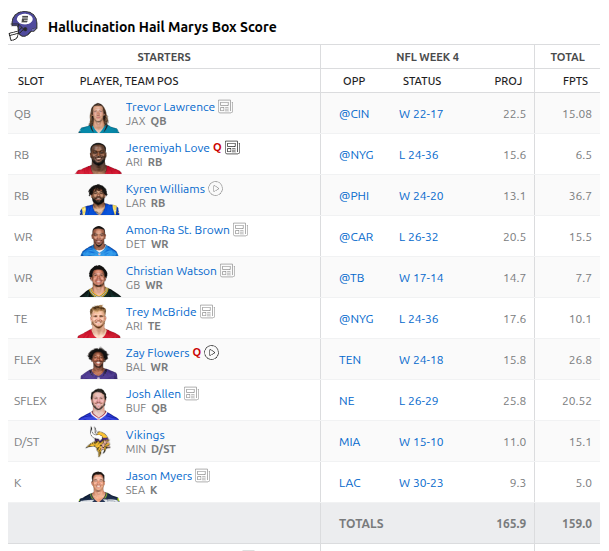
    Week 4 was BAD. Our team under performed and we ultimately lost by nearly 40 points. I checked out bench to see if we could have just picked the wrong players and it wouldn’t have mattered.

    Week 4 Reults

    Trevor Lawrence just didn’t even come close to his projections. The Seahawks don’t kick field goals so we just got 5 extra points. Trey McBride was fighting with the referees… Kyren Williams and Zay Flowers though, amazing players. We love them.

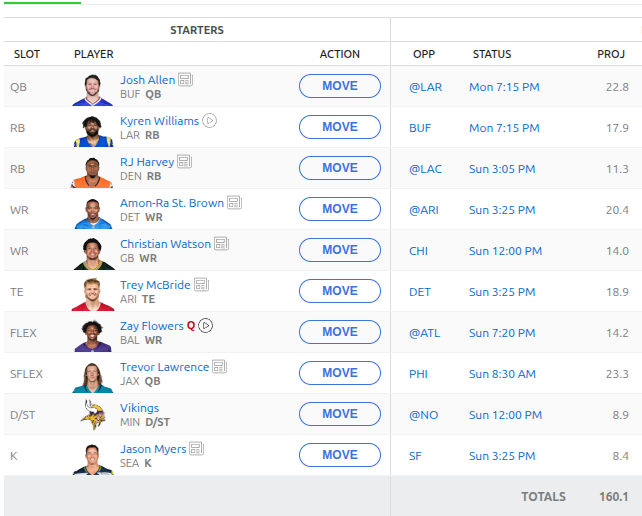
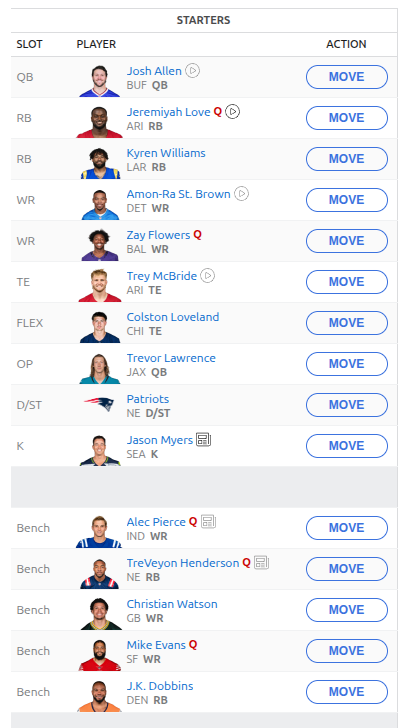
    Here is the line up for week 5

    Week 5 lineup

    Hopefully we get back on our win streak!

    Follow along and never miss an update by subscribing to the mailing list.

    Don’t miss an update

  • Weeks 3 and 4 and an injury discussion

    Weeks 3 and 4 and an injury discussion

    If you’ve been following along, I manage my Fantasy Football team with a custom NFL data set that I’ve been compiling over at https://gridirondata.com. As it stands we are 3-0 on the season! Our week 3 matchup was very close and we won by maybe 1 point. Unfortunately I feel as though it might be on the back of player injury.

    Week 3 Results

    Overall most of our players did well. Josh Allen was not anywhere near his projection but other players helped him out. We are going to continue the streaming defense strategy for the season as it seems to work pretty well. We also claimed a few waivers so some new faces for week 4.

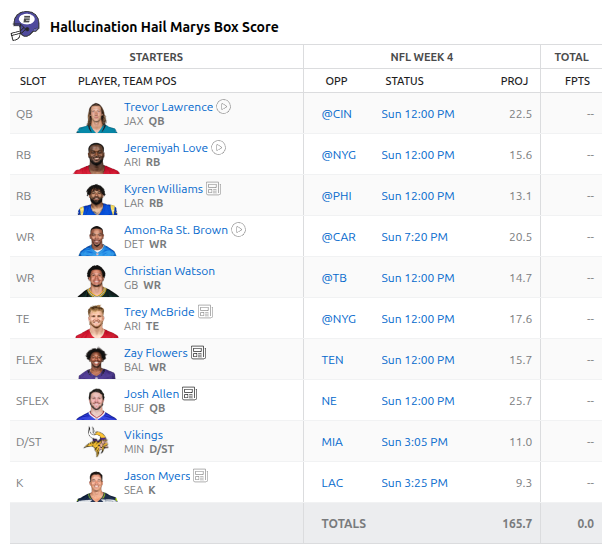
    Week 4 lineup

    Vikings defense for week 4 against Miami. There are some bench players not pictured here to cover for injuries if we have any later in the week.

    Injuries in the NFL have been running rampant this year. It’s only week 4 and we have starting quarterbacks out for the year. This starts to ask the question about how can we predict the possibility of injury in game. For example, if we were starting Sam Darnold in week 1, was it possible to determine that he was going to go out with injury?

    GridIron Data doesn’t ship an “in-game injury” field, but it turns out the data to build one is already there. In-game injuries leave a clear mark in snap share: a receiver who usually plays 85% of snaps logs 22% and then sits the next week. By flagging those sudden drops and confirming them with the next week’s game log, injury status, or injury-tagged news, I can generate thousands of labeled player-games from 2020 through 2026 without a dedicated injury dataset.

    From there, the features mostly come for free: workload and special-teams snaps, the player’s injury status heading into the game (a Questionable tag is probably the strongest signal), prior missed games, and recent jumps in usage. Adding nflverse’s historical injury reports, schedules, and birthdates would bring in practice participation, short weeks, turf, and age, which should sharpen things considerably.

    The goal isn’t a crystal ball. In-game injuries are rare, so the right output is a well-calibrated risk tier (“this RB is about 2–3x baseline this week”) that can feed into projections as an expected-value adjustment, rather than a yes/no prediction. Scoring would run as a weekly Lambda job alongside the existing injury refresh, exposed through a new risk endpoint.

    The bigger opportunity may be real-time: tightening the news pipeline during live games to catch “questionable to return” headlines and push them through the injury changes feed, so Pro users know about an injury before their league does. First step is a backtest of the snap-share labeling to see whether the signal is real. I’ll share what I find.

    Follow along and never miss an update by subscribing to the mailing list.

    Don’t miss an update

  • Tools for a better fantasy football team and Week 2 results

    Tools for a better fantasy football team and Week 2 results

    This is a more technical document about how the tools work for my Fantasy Football agent in conjunction with https://gridirondata.com. At the top level, the coach is a Strands based AI agent that runs Anthropic Claude Sonnet 5 on Amazon Bedrock. The agent knows about my roster, and other teams rosters in my league which is hosted on ESPN’s Fantasy Football platform.

    Lineup Tools:

    • Optimize Lineup: Builds the best starting lineup for a team for any given week. It fills every slot with the highest projected eligible player. Projects are adjusted for injury designation and takes into account players who are on a bye week.
    • Start or sit advice: Compares the best lineup with the teams current starters and says exactly who to start or who to bench OR that no change is needed

    Player Research:

    • Analyze player: A full look at one player for one week: projection, injury status, opponent and bye (from the NFL schedule), boom/bust profile and recent news.
    • Compare players: Compares two players side by side for a week and recommends one to start.
    • Player boom or bust: A player’s season-long deviation profile, showing whether they usually beat or miss their projections and how steady their floor is.
    • Player matchup: How a player has scored against a given opponent in the past. If no opponent is given, it looks one up from the schedule.
    • Player news: Recent headlines for a player (injury, transaction, role), tagged by impact.

    Waivers & Streaming

    • Find waiver targets: Ranks free agents (projected players on no league roster) by how much they would improve on your weakest starter at their position, not just by raw projection
    • Stream defense: Compares your D/ST with the best free-agent defenses: projection, this week’s and next week’s opponent, history against the opponent, and whether streaming is worth it.

    All of these tools have more complex technical code that dictates exactly how they work and access the API. There are also various scoring rules for injured or questionable players. This might result in their projects lowering allowing for a bench player to get the nod to start for the week.

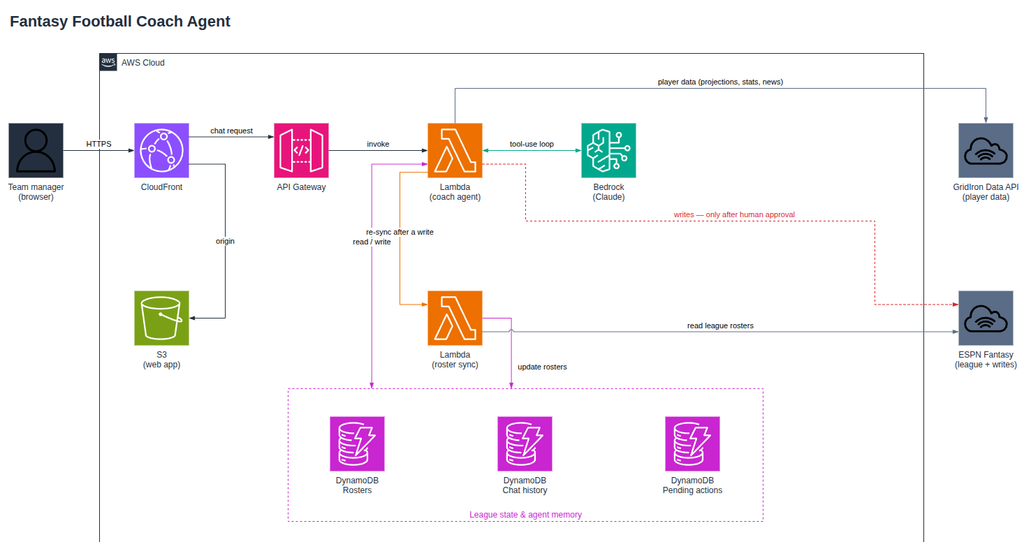
    The architecture is a pretty straightforward serverless design that relies on Cloudfront and S3 for frontend delivery and an API gateway to handle the chat.

    Fantasy Football Agent Architecture

    I use DynamoDB to manage our chat state as well as rosters for every team in the league. Bedrock is the AI layer where Sonnet runs.

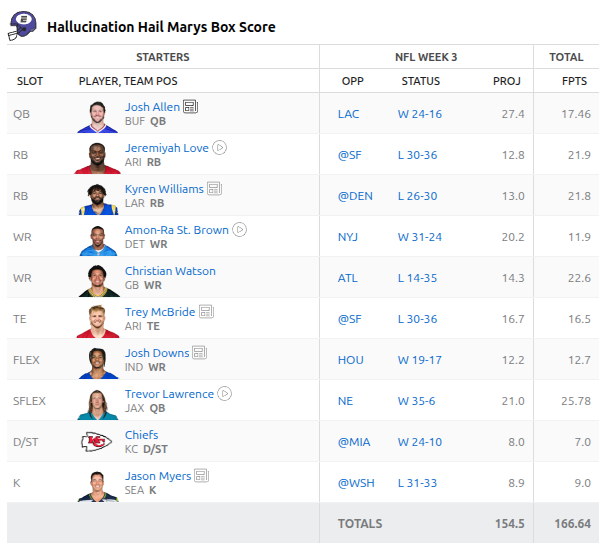
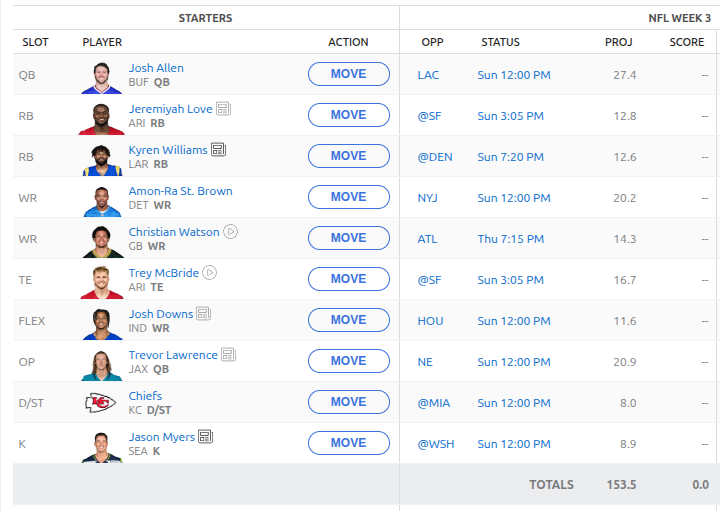
    Anyway, enough nerd talk. Here is the current roster for week 3:

    Notable changes are adding the Chiefs defense against a horrific Miami team. Adding in Josh Downs due to injuries across other wide receivers. I personally would have liked to see the AI select a running back here but it was adamant that Josh Downs was the move.

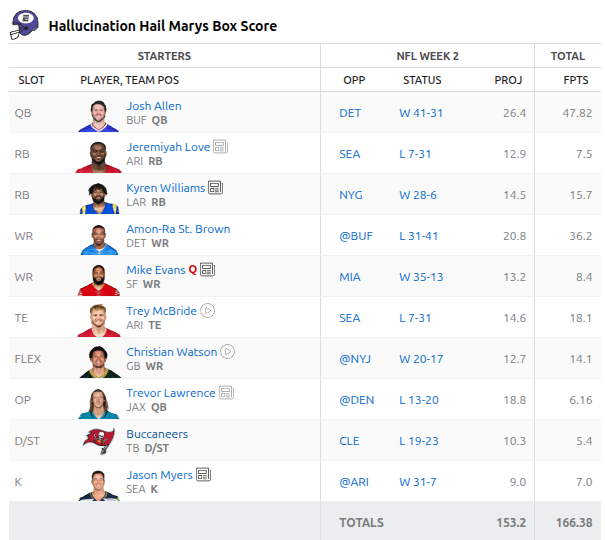
    Another dominate week for us. We are currently in first place in the league. Some players were busts though:

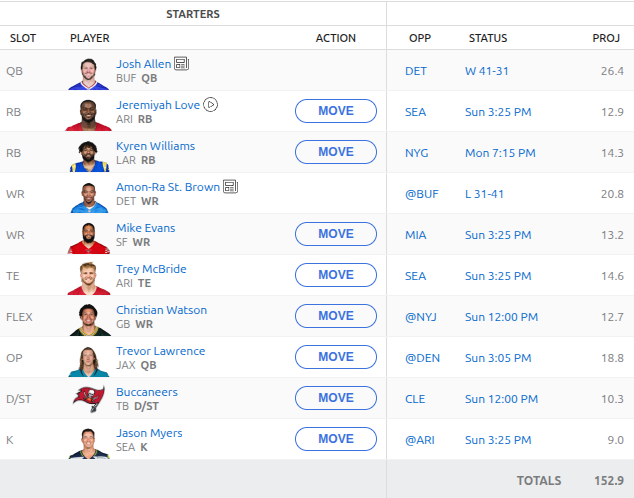
    Jeremiyah Love simply didn’t get the ball when I was watching the Cardinals play. I have no idea what happened with Trevor Lawrence. His receivers couldn’t catch or something and apparently Cleveland figured out how to beat up the Buccaneers. Mike Evans went out with injury but dominate performances from Josh Allen and Amon-Ra St. Brown carried us to victory again.

    See you all next week for another update. If you want me to expand on any topic here feel free to reach out!

    Don’t miss an update

  • Fantasy Football & AI – Week 1 – Season 2

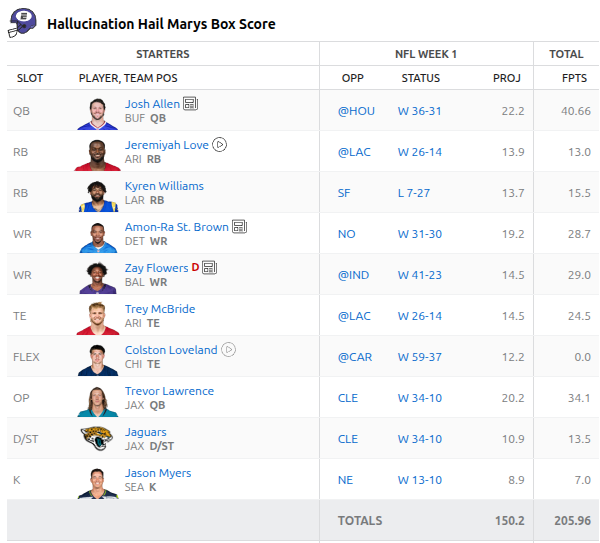
    What a start to the season. HUGE totals from a bunch of a players and one bust. We are starting off the season with a big win. Josh Allen came in big in his season opener, Zay Flowers exited with injury but not before putting up 29 points. Amon Ra St. Brown also put up almost 29 points for us.

    Weirdly, Colston Loveland put up 0 points. I didn’t get to watch the game but his stat line was not great.

    Also, let me introduce you to the “Hallucination Hail Marys”. A fitting name for a team driven by data and AI.

    Week 1 projections and finals

    So, I’m still using https://gridirondata.com as the backend for the AI. I’ve upgraded models to be Claude Haiku 4.5 and of course i’ve kept the personality to be Dan Campbell.

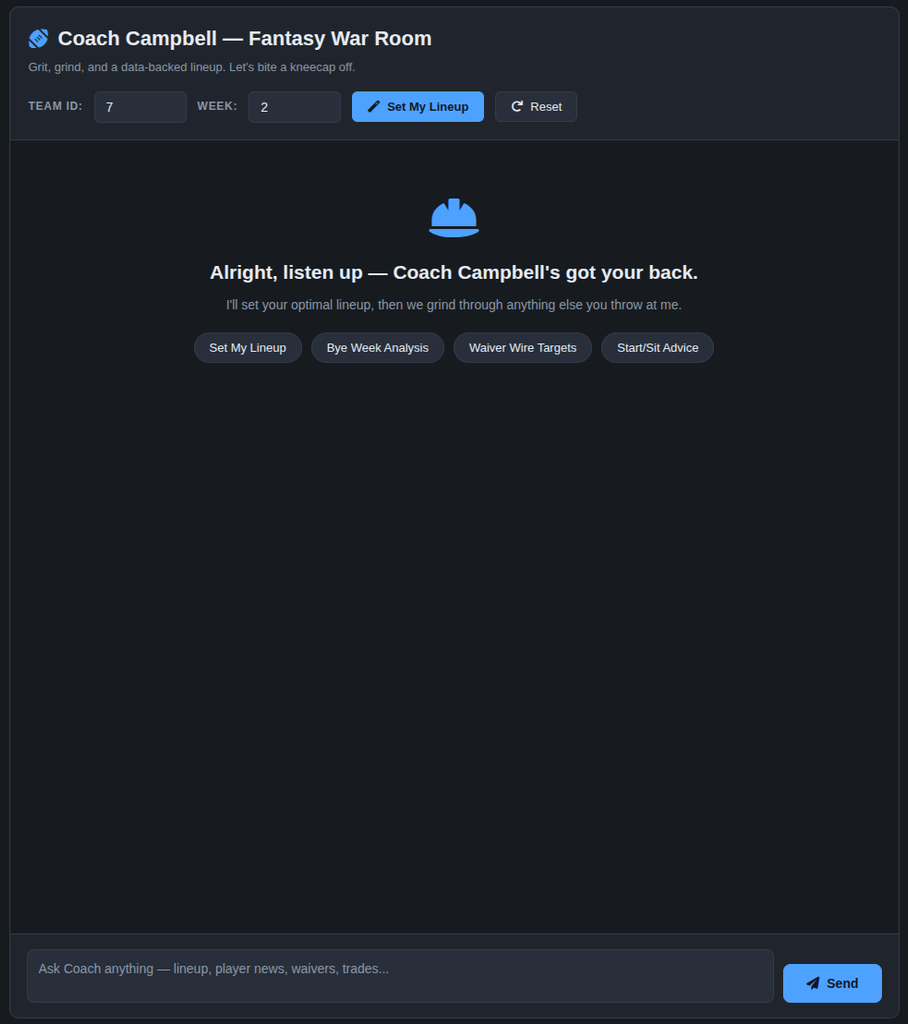
    I’ve updated the interface to be a bit more modern. I’ve also introduced the ability for the AI to be able to update the ESPN roster directly. I’ll go into a full breakdown of all the tools that the agent has to accomplish a winning season in another post.

    For week 2 we’re mostly keeping the same roster. One thing to note is that we swapped defenses. Based on the Brown’s abysmal performance last week, Coach Campbell suggested we grab the Bucanneer’s which I think could be a great move OR the Browns will rally and it won’t work out. I’ve hid some of the actuals because the Bills and Lions played Thursday night. but, its shaping up to be a good week!

    Week 2 projections and lineup

    See you all next week! If there is anything you want me to go more in depth on be sure to reach out!

    Don’t miss an update

  • Building a new SES Monitoring tool

    Building a new SES Monitoring tool

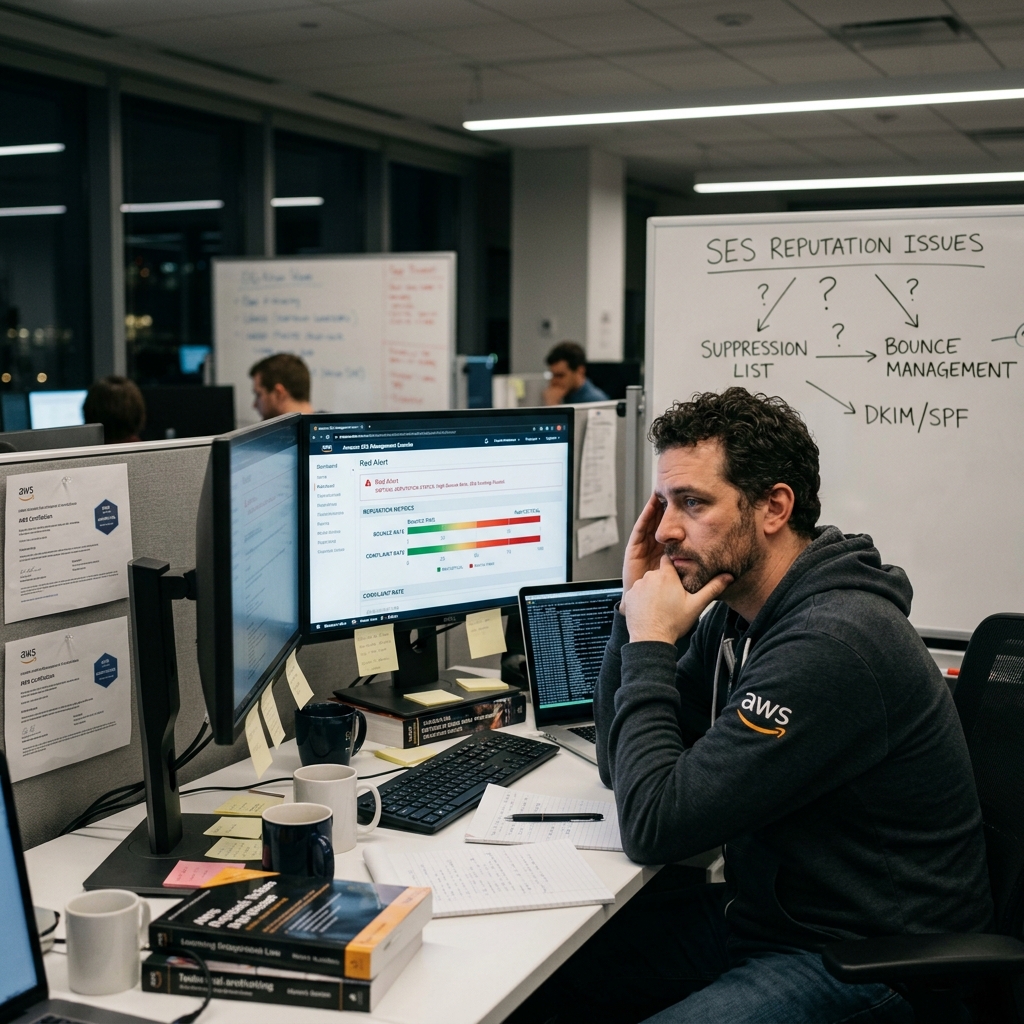
    I’ve been using AWS SES (Simple Email Service) for a long time. I jumped through all the hoops to get production approval. I’ve spent time setting it up and configuring it. I monitor the reputation metrics religiously. But, with over 50 identities configured it’s hard to keep track of what identity might be causing reputation issues at the account level. I spent time with AI coming up with a way to monitor this at the identity level so that I get near real time for failed sends or bounces.

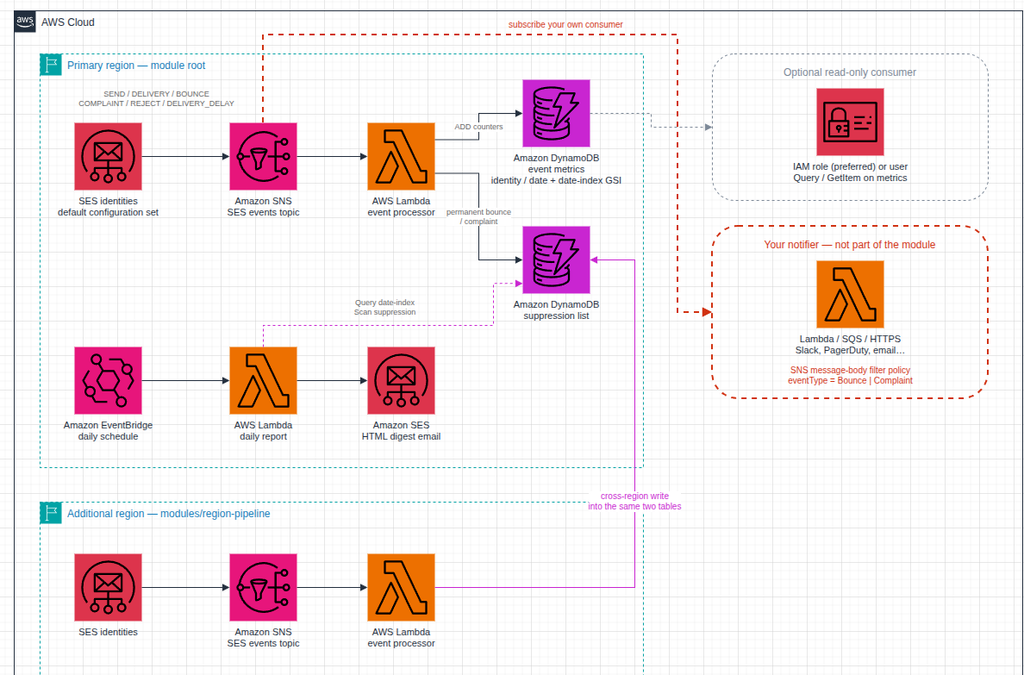
    The goal here is to avoid costly Cloudwatch Alarms. Utilizes nearly free infrastructure to monitor and identify poorly performing identities so that my account reputation can stay green. At the same time, i’m documenting a suppression list that could be utilized cross applications to avoid failed sendings in the future.

    In this pattern, when an email is sent the event is passed into AWS SNS. You can bolt on a separate notifier if required. At the same time, the information will be logged into a DynamoDB table.

    Separately, we have an AWS EventBridge that will run a daily report. It will show you which identities have sent mail as well as whether or not they had any failures or bounces.

    I packaged this all up as a Terraform module so that you can implement it on your own AWS account.

    If you have any feedback or comments feel free to reach out!

    GitHub Repository: https://github.com/avansledright/terraform-module-ses-monitoring

    Don’t miss an update

  • We’re BACK – Fantasy Football 2026-27

    Back by literally no demand will be my Fantasy Football series! New team, new draft agent, new tech to support the team. If you are new here, last year I did a whole series about using AI to manage my Fantasy Football team. I was even . interviewed about it.

    During the NFL offseason I retooled the drafting agent. Some highlights:

    1. New data backbone using https://gridirondata.com that has historical season context, player news, and season actuals (once the season starts)
    2. Newer AI models – Last year I used Anthropic’s Haiku 3.5 model. This year, we have Haiku 4.5. The model reasoning is now more roster aware in the sense that it wants to add starters first and then focus on bench seats.
    3. A real GUI – last years draft was done all via CLI. This year I have a full web interface for drafting, seeing the AI recommendations as well as “best available” players.

    I’m still retooling the “Coach” but don’t worry, I will still force the AI to adopt a Dan Campbell persona.

    So, I present to you for the first time… The Hallucination Hail Mary’s!

    If you think we are going to win the league this year comment below. Otherwise just let me know what you think!

  • Summer 2026: A recap

    I hate to say that summer is over. We still have a few more weeks left but for me it’s back to work and back to regularly scheduled life.

    Taking a look back since my last post a lot has changed. My wife and I welcomed a son to our family which has been the most exciting adventure. We’ve spent the last few months taking care of him and enjoying watching him grow.

    We took on the a great adventure of taking our son to Europe specifically to Croatia for a vacation and to meet the rest of the family. We really enjoyed spending time on the beach and swimming and mostly just being away from our regular life in Chicago. That being said… it was so hot.

    Also, I got a new job! I’ll be updating that on my LinkedIn later this year as its not ready for announcement yet but I am very excited about my new role and what it has to offer for my future career.

    While I was away from work I did work on a few other technical projects:

    1. SEO Score API – I added a deep audit feature set for paying users that allows them to really dig into the technical SEO and SERP
    2. Grid Iron Data – I updated the API to have all the latest players and projections for the new football season.
    3. Fantasy Football – I’ll be back with a new and improved drafting and team management platform this year. I hope to not just write about football again but we will see!

    Hopefully i’ll be back to my monthly cadence of posting about technology projects soon. Life is just a little bit different now.

    Subscribe if you want to get my updates in your inbox!

    Don’t miss an update